The ASP.NET Core Blazor component lifecycle lets you perform additional operations on components during initialization and rendering. It also provides a way to release resources when a component is removed from the page.
Here's the Blazor components lifecycle:
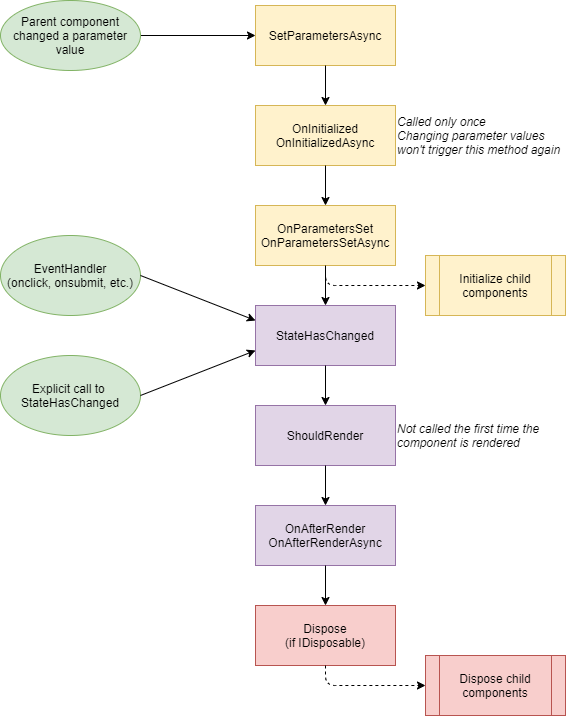
#SetParametersAsync
This method sets the values of properties decorated with [Parameter] or [CascadingParameter] using the values provided by the parent component or cascaded parameters. This is a good place to set default parameter values or read values from the query string.
C#
public override async Task SetParametersAsync(ParameterView parameters)
{
    await base.SetParametersAsync(parameters);
}
#OnInitialized / OnInitializedAsync
Use these methods to initialize data after parameter properties are set. This method is called once per component in Blazor WebAssembly. In Blazor Server, it may be called twice when using pre-rendered mode. You can use these methods to execute code only once. For instance, you can set up the link between 2 components as in the Grid component.
C#
protected override void OnInitialized()
{
}

protected override Task OnInitializedAsync()
{
}
OnParametersSetAsync and OnParametersSet are called after OnInitialized or when the parameters change. You can use these methods to compute derived values based on the parameters. For instance, you can compute any property or field that derives its value from the parameters.
C#
protected override void OnParametersSet()
{
}

protected override Task OnParametersSetAsync()
{
}
#OnAfterRender / OnAfterRenderAsync
OnAfterRenderAsync and OnAfterRender are called after a component has finished rendering. Element and component references are populated at this point. You can use this step to call JavaScript code on the elements. For instance, in the Blazor Modal component, I use this method to open the modal using JavaScript.
C#
protected override void OnAfterRender(bool firstRender)
{
}

protected override Task OnAfterRenderAsync(bool firstRender)
{
}
#ShouldRender
You can use this method to control whether a component needs to re-render after its state changes. This method is called after an explicit call to StateHasChanged or after an event is handled. You can use this method to prevent Blazor from refreshing the UI after a user interacts with the component, if you know it is not needed. As shown in the next section, StateHasChanged can be called twice per event handler. If you have complex rendering logic, overriding ShouldRender can be a good way to optimize the component.
C#
protected override bool ShouldRender()
{
    return base.ShouldRender();
}
#Event handlers
Event handlers can be synchronous or asynchronous in Blazor. In the case of a synchronous event handler StateHasChanged is called after the event handler. In the case of an asynchronous method, StateHasChanged is called twice: once when the synchronous part of the method ends, and a second time when the task is completed.
Razor
<button @onclick="OnClick">Synchronous</button>
<button @onclick="OnClickAsync">Asynchronous</button>

@code{
    void OnClick()
    {
    } // StateHasChanged is called by the base class (ComponentBase) after the method is executed

    async Task OnClickAsync()
    {
        text = "click1";
        // StateHasChanged is called by the base class (ComponentBase) here as the synchronous part of the async method ends
        await Task.Delay(1000);
        await Task.Delay(2000);
        text = "click2";
    } // StateHasChanged is called by the base class (ComponentBase) after the returned task is completed
}
If you want to prevent a user from clicking twice on a button, you can check the following post: Preventing double form submission in a Blazor app
#Component disposal with IDisposable
If a component implements IDisposable, the Dispose method is called when the component is removed from the UI. You can use this method to unsubscribe from events you may have subscribed to, to stop a timer, to cancel an asynchronous operation, etc. You can use @implements IDisposable to indicate your component implements the interface:
Razor
@implements System.IDisposable

<div>A component that implements IDisposable</div>

@code {
    public void Dispose()
    {
    }
}
IAsyncDisposable is not supported for components. However, this should be supported in the next version of Blazor thanks to the following pull request.
Do you have a question or a suggestion about this post? Contact me!
