Improving the startup time of your website is important. Websites can be slow to start for many reasons: loading DLLs, loading data, compiling views, and more. In this post, I'll explain how to reduce startup time by precompiling Razor views.
View precompilation is a build step that compiles .cshtml files into a DLL. Instead of compiling views at runtime the first time they are requested, compilation happens at build time, reducing the startup time of your website.
Microsoft provides a NuGet package to handle this automatically (GitHub). Here's how to use it.
#How to enable razor view precompilation
Add the NuGet package Microsoft.AspNetCore.Mvc.Razor.ViewCompilation
Edit the csproj file and add <MvcRazorCompileOnPublish>true</MvcRazorCompileOnPublish>
csproj (MSBuild project file)
<Project ToolsVersion="15.0" Sdk="Microsoft.NET.Sdk.Web">
  <PropertyGroup>
    <OutputType>Exe</OutputType>
    <TargetFramework>netcoreapp1.1</TargetFramework>
    <PreserveCompilationContext>true</PreserveCompilationContext>
    <MvcRazorCompileOnPublish>true</MvcRazorCompileOnPublish>
  </PropertyGroup>
Publish your site
Shell
dotnet restore
dotnet publish -c release
You should see a *.PrecompiledViews.dll file in the output.
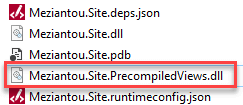 ASP.NET Core Precompiled views dll
That's all it takes!
#What the PrecompiledViews DLL contains
The DLL contains one class per view. Each generated class includes some properties and one method: ExecuteAsync. This method calls Write and WriteLiteral, along with additional calls for infrastructure support.
HTML
@model Page
@{ var page = Model; }
<div class="page">
    @Html.Raw(page.Content)
</div>
C#
namespace AspNetCore
{
  public class _Views_Blog_Page_cshtml : RazorPage<Page>
  {
    [RazorInject]
    public IModelExpressionProvider ModelExpressionProvider { get; private set; }

    [RazorInject]
    public IUrlHelper Url { get; private set; }

    [RazorInject]
    public IViewComponentHelper Component { get; private set; }

    [RazorInject]
    public IJsonHelper Json { get; private set; }

    [RazorInject]
    public IHtmlHelper<Page> Html { get; private set; }

    public override async Task ExecuteAsync()
    {
      Page model = this.Model;
      this.BeginContext(91, 24, true);
      this.WriteLiteral((object) "<div class=\"page\">\r\n    ");
      this.EndContext();
      this.BeginContext(116, 22, false);
      this.Write((object) this.Html.Raw(model.Content));
      this.EndContext();
      this.BeginContext(138, 8, true);
      this.WriteLiteral((object) "\r\n</div>");
      this.EndContext();
    }
  }
}
The generated code can be more complex if your view uses more logic or tag helpers.
#Conclusion
Depending on the number of views in your website, you will notice a meaningful reduction in startup time. Even if you don't have many views, the integration is simple enough that you should enable it regardless.
Do you have a question or a suggestion about this post? Contact me!
