This post is part of the series 'MSTest v2'. Be sure to check out the rest of the blog posts of the series!
When you create a .NET library, you can target multiple frameworks such as .NET Framework, .NET Core, and Universal Windows Platform, across different versions. Writing code that targets .NET Standard lets you reach the widest range of platforms at once. Even so, you should verify that your code behaves correctly on each target platform. For example, if you publish a .NET Standard 2.0 library, you may want to test it on both .NET Core 2.0 and .NET Framework 4.6.1. The .NET Standard compatibility table in the documentation lists which platforms are supported.
With the SDK-style project format, you can target multiple frameworks in a single project file. The test runner will execute tests against all of them.
Open the csproj of the test project.
Replace TargetFramework with TargetFrameworks (plural) and list the desired frameworks separated by semicolons. The list of supported framework monikers is available in the documentation.
Before:
csproj (MSBuild project file)
<TargetFramework>netcoreapp2.0</TargetFramework>
After:
csproj (MSBuild project file)
<TargetFrameworks>net461;net47;netcoreapp2.0</TargetFrameworks>
Run the tests using the command line:
Shell
dotnet test
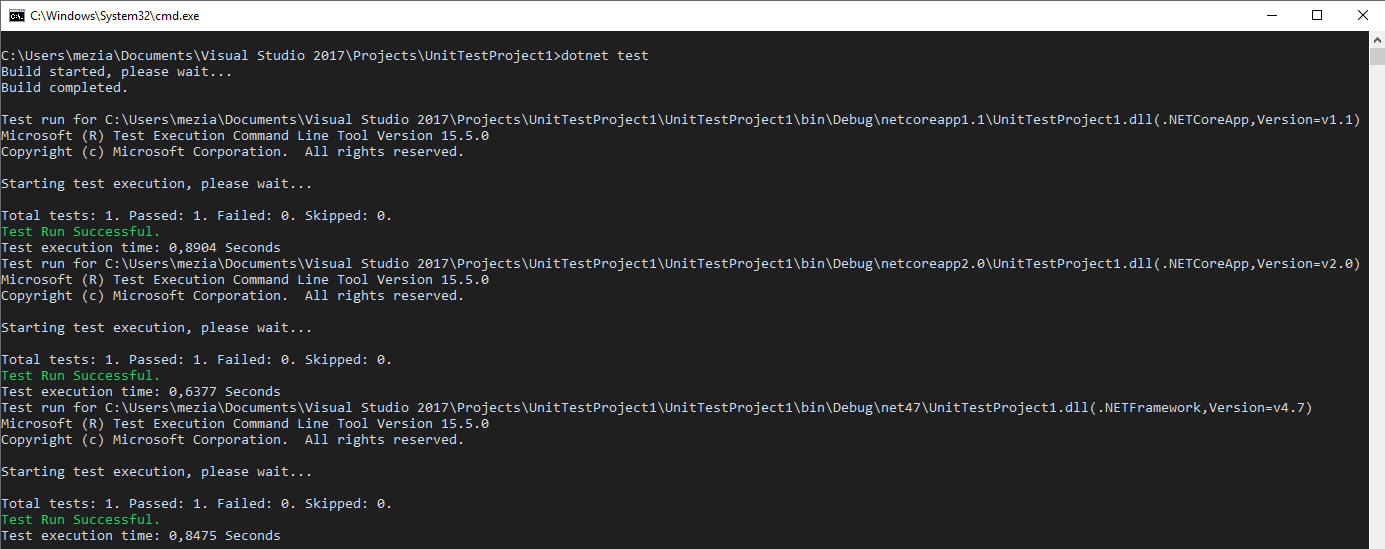
The unit tests run once per target framework, ensuring your code behaves consistently across all platforms.
Note: The Visual Studio Test Explorer does not support multiple target frameworks. It will only display and run tests for a single platform.
Do you have a question or a suggestion about this post? Contact me!
