I submitted a pull request to the ASP.NET Core repository. Initially, the change was simply replacing unsafe code (char* with stackalloc) with a safe equivalent using Span<T>, so it was a small update. During the review, Oleksandr Kolomiiets, Günther Foidl, and David Fowler suggested several additional changes to improve performance. The comments were very insightful, so I decided to write them up in a post.

Here is an explanation of each change, and you'll see that the final code is twice as fast as the initial code!
#Original code
The code encodes a long number as a base-32 string. It was already optimized as noted in the comment, but we'll see how we can optimize it even further!
C#
private static readonly string s_encode32Chars = "0123456789ABCDEFGHIJKLMNOPQRSTUV";

public static unsafe string GenerateId(long id)
{
    // The following routine is ~310% faster than calling long.ToString() on x64
    // and ~600% faster than calling long.ToString() on x86 in tight loops of 1 million+ iterations
    // See: https://github.com/aspnet/Hosting/pull/385

    // stackalloc to allocate array on stack rather than heap
    char* buffer = stackalloc char[13];
    buffer[0] = s_encode32Chars[(int)(id >> 60) & 31];
    buffer[1] = s_encode32Chars[(int)(id >> 55) & 31];
    buffer[2] = s_encode32Chars[(int)(id >> 50) & 31];
    buffer[3] = s_encode32Chars[(int)(id >> 45) & 31];
    buffer[4] = s_encode32Chars[(int)(id >> 40) & 31];
    buffer[5] = s_encode32Chars[(int)(id >> 35) & 31];
    buffer[6] = s_encode32Chars[(int)(id >> 30) & 31];
    buffer[7] = s_encode32Chars[(int)(id >> 25) & 31];
    buffer[8] = s_encode32Chars[(int)(id >> 20) & 31];
    buffer[9] = s_encode32Chars[(int)(id >> 15) & 31];
    buffer[10] = s_encode32Chars[(int)(id >> 10) & 31];
    buffer[11] = s_encode32Chars[(int)(id >> 5) & 31];
    buffer[12] = s_encode32Chars[(int)id & 31];
    return new string(buffer);
}
#Using Span<T>
My first commit replaces the unsafe code with Span<char>. It is nothing more than a small rewrite that does not impact performance. This change is now possible as ASP.NET Core 3 will only support .NET Core 3. ASP.NET Core 2.2 targets .NET Standard 2.0 which doesn't contain Span<T>. If you are not familiar with Spans, you should read the Adam Sitnik's post: https://adamsitnik.com/Span/.
Here're the changes:
C#
private static readonly string s_encode32Chars = "0123456789ABCDEFGHIJKLMNOPQRSTUV";

// Remove unsafe keyword
public static string GenerateId(long id)
{
    // Replace char* with Span<T>
    Span<char> buffer = stackalloc char[13];
    buffer[0] = s_encode32Chars[(int)(id >> 60) & 31];
    buffer[1] = s_encode32Chars[(int)(id >> 55) & 31];
    ...
    buffer[11] = s_encode32Chars[(int)(id >> 5) & 31];
    buffer[12] = s_encode32Chars[(int)id & 31];
    return new string(buffer, 0, 13);
}
#Using string.Create
A first optimization is to use string.Create. In the previous code, a buffer is created on the stack, then the string is created on the heap from the buffer. This means the buffer is copied to the new string instance. Using string.Create we avoid the copy of the buffer. The method allocates the string directly on the heap and you can set the content using the delegate (code on GitHub).
C#
private static readonly string s_encode32Chars = "0123456789ABCDEFGHIJKLMNOPQRSTUV";

public static string GenerateId(long id)
{
    return string.Create(13, id, (buffer, value) =>
    {
        // Do not use "id" here as it would create a closure and allocate
        // instead use "value" (read hereafter for more details)
        buffer[0] = s_encode32Chars[(int)(value >> 60) & 31];
        buffer[1] = s_encode32Chars[(int)(value >> 55) & 31];
        ...
        buffer[11] = s_encode32Chars[(int)(value >> 5) & 31];
        buffer[12] = s_encode32Chars[(int)value & 31];
    }
}
You may have noticed that I do not use id inside the lambda expression. Using it would introduce a closure. A closure is costly here because the delegate cannot be cached, and a new delegate is instantiated on every call. This would reduce performance (by about 30% in this case) and add pressure on the GC. This is the reason why the second parameter of String.Create exists. This parameter prevents the use of closures. You can read more about closures on the Jetbrains'blog.
The benchmark indicates using string.Create is about 35% faster!
Steve Gordon has written a post about string.Create: Creating Strings with No Allocation Overhead Using String.Create
#Reversing assignment order
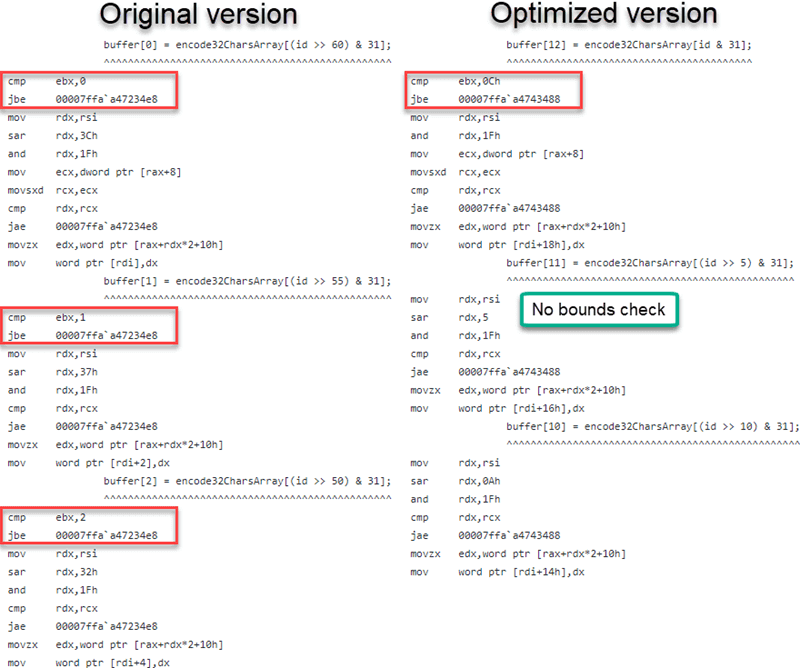
David Fowler suggested reversing the assignment order (assigning buffer[12] first, then buffer[11], and so on). This allows the JIT to eliminate bounds checks. If index 12 is accessible, all lower indices are guaranteed to be in range.
C#
private static readonly string s_encode32Chars = "0123456789ABCDEFGHIJKLMNOPQRSTUV";

public static string GenerateId(long id)
{
    return string.Create(13, id, (buffer, value) =>
    {
        // Assign buffer from 12 to 0 to avoid a bound check
        buffer[12] = s_encode32Chars[(int)value & 31];
        buffer[11] = s_encode32Chars[(int)(value >> 5) & 31];
        ...
        buffer[1] = s_encode32Chars[(int)(value >> 55) & 31];
        buffer[0] = s_encode32Chars[(int)(value >> 60) & 31];
    }
}
Although the JIT emits optimized code, the optimized version shows no measurable performance difference on my computer. As suggested by Günther Foidl, this is likely because the branch predictor of the CPU handles this case well. That does not mean the optimization is useless: other CPUs may not predict this pattern as effectively. In addition, the emitted code is smaller, which is always beneficial.
Here's the assembly code generated by the JIT with the optimization.
The full assembly code is available on the following Gist:
- Unoptimized version: You can see the bounds check at every access (line 273, 286, 297, and so on)
- Optimized version: You can see there is a bounds check only for the first access (line 76), but not for the next accesses (line 88)
#Copying the field into a local variable
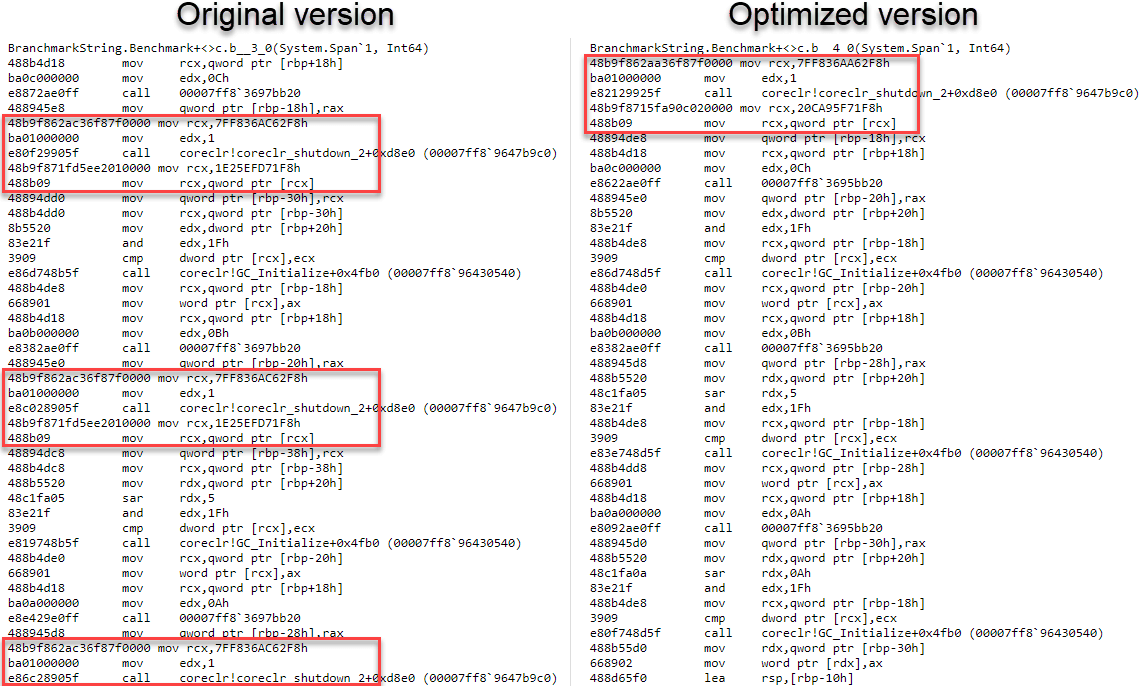
The JIT must emit code to reload s_encode32Chars on each access. Unfortunately, readonly fields do not convey useful information to the JIT. When the array reference is held by the s_encode32Chars field, the JIT conservatively assumes that s_encode32Chars may change at any time, so it cannot guarantee that the array length at one read matches the array length at the next. Hence a bounds check is required to preserve memory safety. Andy Ayers explains this behavior in more detail in this issue: Bounds checks not removed in several cases.
You can remove additional bound checks by loading the field once into a local, so the JIT can track that nothing changes and read-only access is done.
C#
private static readonly string s_encode32Chars = "0123456789ABCDEFGHIJKLMNOPQRSTUV";

public static string GenerateId(long id)
{
    return string.Create(13, id, (buffer, value) =>
    {
        // Copy the reference
        var encode32Chars = s_encode32Chars;

        buffer[12] = encode32Chars[(int)value & 31];
        buffer[11] = encode32Chars[(int)(value >> 5) & 31];
        ...
        buffer[1] = encode32Chars[(int)(value >> 55) & 31];
        buffer[0] = encode32Chars[(int)(value >> 60) & 31];
    }
}
The benchmark indicates the code is about 4% faster than the previous version!
#Removing the explicit cast
The last optimization is to remove the explicit cast to int. The string indexer only accepts an int, which requires the cast. Changing the field type from string to char[] allows using a long directly as the index. Without the casts, the JIT produces better code on 64-bit systems. On 32-bit systems, additional code may be generated, slightly hurting performance. Since most applications – especially web servers – now run on 64-bit, this trade-off is acceptable.
C#
// Change from string to char[], so we can use the long
private static readonly char[] s_encode32Chars = "0123456789ABCDEFGHIJKLMNOPQRSTUV".ToCharArray();

public static string GenerateId(long id)
{
    return string.Create(13, id, (buffer, value) =>
    {
        var encode32Chars = s_encode32Chars;

        // Remove explicit cast in the indexer
        buffer[12] = encode32Chars[value & 31];
        buffer[11] = encode32Chars[(value >> 5) & 31];
        ...
        buffer[1] = encode32Chars[(value >> 55) & 31];
        buffer[0] = encode32Chars[(value >> 60) & 31];
    }
}
The benchmark indicates the code is about 5% faster than the previous version!
#Benchmark
I've created a benchmark using BenchmarkDotNet to measure how performant each change of the pull request is. You can find the code on Gist.

BenchmarkDotNet=v0.11.3, OS=Windows 10.0.17763.253 (1809/October2018Update/Redstone5)
Intel Core i5-6600 CPU 3.30GHz (Skylake), 1 CPU, 4 logical and 4 physical cores
.NET Core SDK=3.0.100-preview-009812
  [Host] : .NET Core 3.0.0-preview-27122-01 (CoreCLR 4.6.27121.03, CoreFX 4.7.18.57103), 64bit RyuJIT
  Core   : .NET Core 3.0.0-preview-27122-01 (CoreCLR 4.6.27121.03, CoreFX 4.7.18.57103), 64bit RyuJIT

Job=Core  Runtime=Core
| Method | Mean | Median | Allocated Memory/Op |
|---|
| Original | 34.21 ns | 34.24 ns | 48 B |
| Span | 33.86 ns | 33.77 ns | 48 B |
| String.Create | 21.87 ns | 22.15 ns | 48 B |
| String.Create with closure | 46.30 ns | 46.30 ns | 136 B |
| Reverse assignation | 21.69 ns | 21.59 ns | 48 B |
| Use local | 18.95 ns | 18.98 ns | 48 B |
| Remove explicit cast | 17.85 ns | 17.16 ns | 48 B |
The final code is twice as fast as the original and contains no unsafe code. Thanks to all the reviewers of the pull request for introducing me to these techniques!
Here's another great post about these changes by Nima Ara: Generating IDs in C#, 'safely' and efficiently
Do you have a question or a suggestion about this post? Contact me!
