ASP.NET WebForms has long provided a validation system for user input, handling validation on both the server and client side.
HTML
<div class="form-group">
   <asp:Label runat="server" CssClass="control-label" AssociatedControlID="Name" Text="Name" />
   <asp:TextBox runat="server" ID="Name" CssClass="form-control" />
   <asp:RequiredFieldValidator runat="server" CssClass="help-block"
   ControlToValidate="Name" ErrorMessage="Enter your name" />
</div>
When the textbox is empty, the error message specified appears:
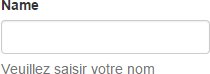
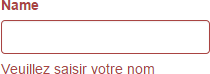
To properly integrate with Bootstrap and display the error styling, you also need to add the has-error class to the enclosing div when the value is invalid.
To achieve this, we extend the ValidatorUpdateDisplay JavaScript method generated by ASP.NET WebForms:
JavaScript
function extendedValidatorUpdateDisplay(obj) {
    // call the original method to update the state of the controls
    if (typeof originalValidatorUpdateDisplay === "function") {
        originalValidatorUpdateDisplay(obj);
    }

    // Get the state of the control (valid or invalid)
    // and add or remove the class has-error
    var control = document.getElementById(obj.controltovalidate);
    if (control) {
        var isValid = true;
        for (var i = 0; i < control.Validators.length; i += 1) {
            if (!control.Validators[i].isvalid) {
                isValid = false;
                break;
            }
        }

        $(control).closest(".form-group").toggleClass("has-error", !isValid);
    }
}

// Replace the method ValidatorUpdateDisplay by our method
var originalValidatorUpdateDisplay = window.ValidatorUpdateDisplay;
window.ValidatorUpdateDisplay = extendedValidatorUpdateDisplay;
Here's the result:
Despite its age, ASP.NET WebForms can still be integrated with modern frameworks without much trouble. 😃
The complete code of the example is available on GitHub.
Do you have a question or a suggestion about this post? Contact me!
