In a previous post about performance tricks about strings, several readers mentioned they were unaware of the performance impact of captured variables in lambda expressions. This post explores another example using ConcurrentDictionary<TKey, TValue>.
The class ConcurrentDictionary<TKey, TValue> is often used for caching data, so you want it to be as fast as possible. In this usage, you mainly use 3 methods: GetOrAdd, AddOrUpdate, TryGetValue.
The second parameter of GetOrAdd and AddOrUpdate is often not used correctly. A common mistake is ignoring the delegate parameter, as shown in the following code:
C#
var dictionary = new ConcurrentDictionary<int, string>();
var key = 42;
dictionary.GetOrAdd(key, _ => key.ToString()); // Don't use this code
The problem here is that the lambda captures the variable key. The compiler generates a new class and instantiates it before each call to GetOrAdd. This causes an allocation on every call, increasing both allocation time and GC pressure. Here is the code generated by the compiler:
C#
public void Capture()
{
    var concurrentDictionary = new ConcurrentDictionary<int, string>();
    for (int key = 0; key < 1000000; ++key)
    {
        // instantiate the generated class
        var cDisplayClass00 = new <>c__DisplayClass0_0();
        cDisplayClass00.j = key;
        concurrentDictionary.GetOrAdd(key, new Func<int, string>((object) cDisplayClass00, __methodptr(<Capture>b__0)));
    }
}
Instead you should use the parameter of the delegate:
C#
var dictionary = new ConcurrentDictionary<int, string>();
var key = 42;
dictionary.GetOrAdd(key, k => k.ToString());
In this case there is no captured variable, so the compiler generates more optimized code. The compiler still generates a class, but it uses a singleton instead of allocating a new instance on each call.
C#
public void NoCapture()
{
    var concurrentDictionary = new ConcurrentDictionary<int, string>();
    for (int key = 0; key < 1000000; ++key)
    {
        concurrentDictionary.GetOrAdd(key, <>c.<>9__1_0 ?? (<>c.<>9__1_0 = new Func<int, string>((object) <>c.<>9, __methodptr(<NoCapture>b__1_0))));
    }
}

[CompilerGenerated]
[Serializable]
private sealed class <>c
{
    public static readonly <>c <>9;
    public static Func<int, string> <>9__1_0;

    static <>c()
    {
        <>c.<>9 = new <>c();
    }

    internal string <NoCapture>b__1_0(int key)
    {
    return key.ToString();
    }
}
C#
var key = 1;
var value = "1";
var concurrentDictionary = new ConcurrentDictionary<int,string>();

// ⚠️ Create a closure
concurrentDictionary.GetOrAdd(key, k => valut);

// ✔️ Use the latest argument to avoid a closure
concurrentDictionary.GetOrAdd(key, (k, v) => v, value);
Using BenchmarDotNet, you can compare the performance of each implementation:
C#
internal static class Program
{
    private static void Main() => BenchmarkRunner.Run<Benchmark>();
}

[CoreJob]
[MemoryDiagnoser]
public class Benchmark
{
    [Benchmark]
    public void Capture()
    {
        var dictionary = new ConcurrentDictionary<int, string>();
        for (int i = 0; i < 1000000; i++)
        {
            var j = i; // Ensure we capture one variable per iteration
            dictionary.GetOrAdd(i, _ => j.ToString());
        }
    }

    [Benchmark]
    public void NoCapture()
    {
        var dictionary = new ConcurrentDictionary<int, string>();
        for (int i = 0; i < 1000000; i++)
        {
            dictionary.GetOrAdd(i, key => key.ToString());
        }
    }
}
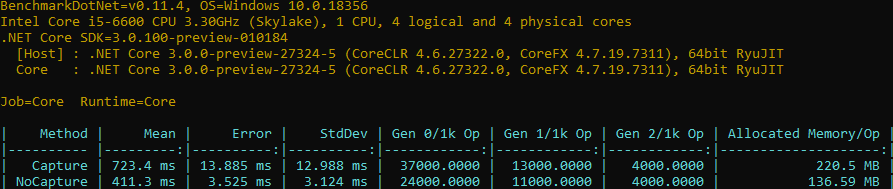
The version that captures the variable is about 77% slower and allocates 84% more. Excessive allocations matter because the Garbage Collector may pause your application to reclaim the allocated memory.
#Roslyn analyzer
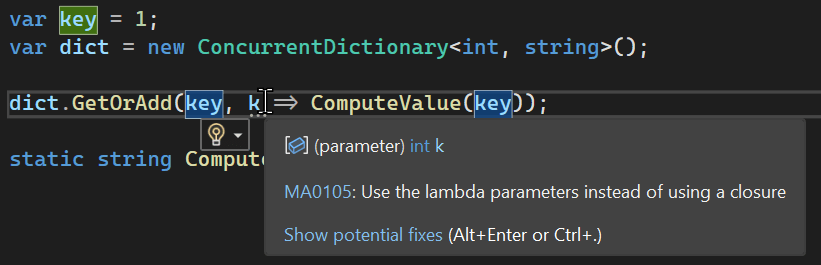
You can use Meziantou.Analyzer to detect useless closures and avoid performance issues.
C#
dotnet add package Meziantou.Analyzer
Do you have a question or a suggestion about this post? Contact me!
