Windows 10 introduced Virtual Desktops, along with guidelines for how applications should behave. From the documentation:
Applications should avoid automatically switching the user from one virtual desktop to another. Only the user should instigate that change. To support this, newly created windows should appear on the currently active virtual desktop. Besides, if an application can reuse currently active windows, it should only reuse windows if they are on the currently active virtual desktop. Otherwise, a new window should be created.
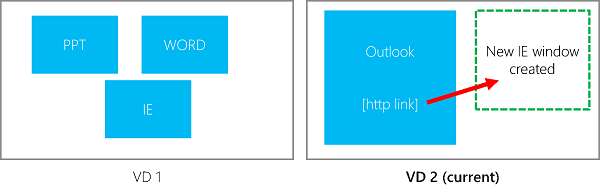
learn.microsoft.com
To reuse an existing window, you need to check whether it is on the currently active virtual desktop. Windows provides the IVirtualDesktopManager interface for working with virtual desktops. For this use case, you can call the IsWindowOnCurrentVirtualDesktop method to determine whether a window is on the current virtual desktop.
C#
[ComImport, InterfaceType(ComInterfaceType.InterfaceIsIUnknown), Guid("a5cd92ff-29be-454c-8d04-d82879fb3f1b")]
[SuppressUnmanagedCodeSecurity]
internal interface IVirtualDesktopManager
{
    [PreserveSig]
    int IsWindowOnCurrentVirtualDesktop([In] IntPtr TopLevelWindow, [Out] out int OnCurrentDesktop);

    [PreserveSig]
    int GetWindowDesktopId([In] IntPtr TopLevelWindow, [Out] out Guid CurrentDesktop);

    [PreserveSig]
    int MoveWindowToDesktop([In] IntPtr TopLevelWindow, [MarshalAs(UnmanagedType.LPStruct)][In] Guid CurrentDesktop);
}

[ComImport, Guid("aa509086-5ca9-4c25-8f95-589d3c07b48a")]
internal class CVirtualDesktopManager
{
}

public class VirtualDesktopManager
{
    private readonly IVirtualDesktopManager _manager;

    public VirtualDesktopManager()
    {
        _manager = (IVirtualDesktopManager)new CVirtualDesktopManager();
    }

    public bool IsWindowOnCurrentVirtualDesktop(IntPtr TopLevelWindow)
    {
        int hr = _manager.IsWindowOnCurrentVirtualDesktop(TopLevelWindow, out int result);
        if (hr != 0)
        {
            Marshal.ThrowExceptionForHR(hr);
        }

        return result != 0;
    }

    public Guid GetWindowDesktopId(IntPtr TopLevelWindow)
    {
        int hr = _manager.GetWindowDesktopId(TopLevelWindow, out Guid result);
        if (hr != 0)
        {
            Marshal.ThrowExceptionForHR(hr);
        }

        return result;
    }

    public void MoveWindowToDesktop(IntPtr TopLevelWindow, Guid CurrentDesktop)
    {
        int hr = _manager.MoveWindowToDesktop(TopLevelWindow, CurrentDesktop);
        if (hr != 0)
        {
            Marshal.ThrowExceptionForHR(hr);
        }
    }
}
You can then use VirtualDesktopManager in your application to check whether a window is on the current desktop:
C#
private static void Main()
{
    var virtualDesktopManager = new VirtualDesktopManager();
    var currentProcess = Process.GetCurrentProcess();
    var processlist = Process.GetProcessesByName(currentProcess.ProcessName);
    foreach (Process process in processlist)
    {
        if (process.Id == currentProcess.Id)
            continue;

        if (process.MainWindowHandle != IntPtr.Zero)
        {
            if (virtualDesktopManager.IsWindowOnCurrentVirtualDesktop(process.MainWindowHandle))
            {
                // Activate the existing window and exit the current process
                SetForegroundWindow(process.MainWindowHandle);
                Environment.Exit(0);
                return;
            }
        }
    }

    // TODO actual application code
}

[DllImport("user32.dll")]
private static extern bool SetForegroundWindow(IntPtr hWnd);
#Additional references
Do you have a question or a suggestion about this post? Contact me!
