This post is part of the series 'Microsoft SQL Server 2016'. Be sure to check out the rest of the blog posts of the series!
SQL Server 2016 has recently been released. This post explores one of its new features: Temporal Tables.
Temporal Tables automatically keep a history of all changes to a table. A Temporal Table consists of two linked tables: the first holds the current data, while the second holds the historical data. All INSERT, UPDATE, and DELETE operations are performed on the main table, and SQL Server automatically copies the previous row versions to the history table. This makes querying historical data straightforward.
For example, we will create a table containing currency exchange rates:
SQL
CREATE TABLE dbo.ExchangeRate
(
    Id int NOT NULL IDENTITY(1,1) PRIMARY KEY,
    Currency nchar(3) NOT NULL,
    Rate float NOT NULL,

    ValidFrom datetime2 GENERATED ALWAYS AS ROW START NOT NULL, -- add HIDDEN for hiding this column in SELECT *
    ValidTo datetime2 GENERATED ALWAYS AS ROW END NOT NULL,

    PERIOD FOR SYSTEM_TIME (
        ValidFrom,
        ValidTo
    )
)
WITH (SYSTEM_VERSIONING = ON
(
  HISTORY_TABLE = dbo.ExchangeRateHistory,
  DATA_CONSISTENCY_CHECK = ON, -- Ensure ValidFrom <= ValidTo
))
GO
To create the table, declare the columns you need and add two system columns, ValidFrom and ValidTo, declared as PERIOD FOR SYSTEM_TIME. These tell SQL Server which columns to use when querying history. You also specify the name of the history table, ExchangeRateHistory, where SQL Server stores the previous row versions.
To add or modify data, use the standard INSERT, UPDATE, and DELETE statements on the ExchangeRate table. Attempting to modify the ExchangeRateHistory table directly will result in an error.
SQL
INSERT INTO ExchangeRate(Currency, Rate)
VALUES('USD', 1)

INSERT INTO ExchangeRate(Currency, Rate)
VALUES('EUR', 1)

UPDATE ExchangeRate
SET Rate = 2
WHERE Currency = 'EUR'

UPDATE ExchangeRate
SET Rate = 1.5
WHERE Currency = 'EUR'

UPDATE ExchangeRate
SET Rate = 1.3
WHERE Currency = 'EUR'

UPDATE ExchangeRate
SET Rate = 1.4
WHERE Currency = 'EUR'
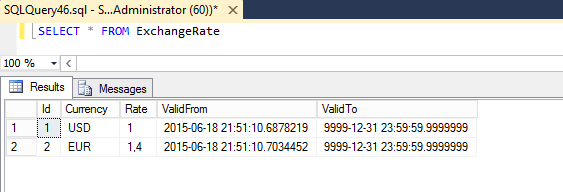
The table contains only 2 rows:
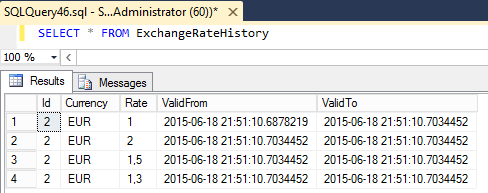
And the history table contains several more rows:
Sometimes it is useful to modify the dates in the history table. To do this, disable the link between the two tables, make your changes, then re-enable it:
SQL
ALTER TABLE ExchangeRate SET ( SYSTEM_VERSIONING = OFF )
GO

UPDATE ExchangeRateHistory SET ValidFrom='2015-01-01 00:00:00', ValidTo='2015-01-01 23:59:59' WHERE Rate = 1
UPDATE ExchangeRateHistory SET ValidFrom='2015-01-02 00:00:00', ValidTo='2015-01-02 23:59:59' WHERE Rate = 2
UPDATE ExchangeRateHistory SET ValidFrom='2015-01-03 00:00:00', ValidTo='2015-01-03 23:59:59' WHERE Rate = 1.5
UPDATE ExchangeRateHistory SET ValidFrom='2015-01-04 00:00:00', ValidTo='2015-01-04 23:59:59' WHERE Rate = 1.3
UPDATE ExchangeRateHistory SET ValidFrom='2015-01-05 00:00:00', ValidTo='2015-01-05 23:59:59' WHERE Rate = 1.4

ALTER TABLE ExchangeRate SET (SYSTEM_VERSIONING = ON (HISTORY_TABLE = dbo.ExchangeRateHistory))
GO
Instead of querying the history table directly, you can use the FOR SYSTEM_TIME clause on the main table:
FOR SYSTEM_TIME AS OF '2015-01-01'FOR SYSTEM_TIME FROM '2015-01-01' TO '2015-01-05'FOR SYSTEM_TIME BETWEEN '2015-01-01' AND '2015-01-05'FOR SYSTEM_TIME CONTAINED IN ('2015-01-01', '2015-01-05')
FOR SYSTEM_TIME works with both tables and views. When used with a view, the filter applies to all tables referenced by that view.
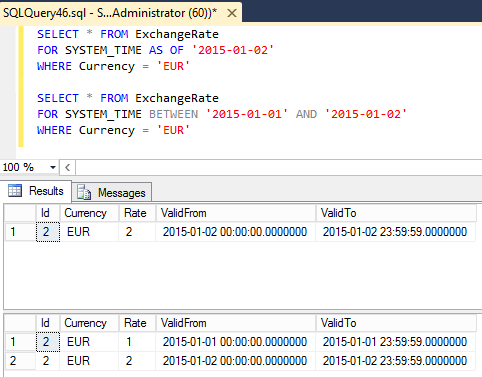
SQL
SELECT * FROM ExchangeRate
FOR SYSTEM_TIME AS OF '2015-01-02'
WHERE Currency = 'EUR'

SELECT * FROM ExchangeRate
FOR SYSTEM_TIME BETWEEN '2015-01-01' AND '2015-01-02'
WHERE Currency = 'EUR'
For a view, the syntax is the same:
SQL
SELECT * FROM MyView
FOR SYSTEM_TIME BETWEEN '2015-01-01' AND '2015-01-01'
WHERE Currency = 'EUR'
#Conclusion
Temporal Tables provide a seamless way to add history tracking to a database. Once enabled, no changes to existing queries or applications are required. Querying historical data is straightforward using the FOR SYSTEM_TIME clause. A very practical feature!
Do you have a question or a suggestion about this post? Contact me!
